Traditional book reports should be a thing of the past. I mean, do you really want to read 30-125 recaps of the same book? (YAWN!) Well, guess what, your students don't want to write them either. They are boring and tedious. And most importantly, they really don't measure the comprehension of a text or confirm that they have even read the text assigned. All these reports prove is that your students are capable of using SparkNotes or Wikipedia with a certain amount of expertise.
Don't just have your students report on what they are reading. Encourage them to interact with it instead.
Technology-Enhanced Book Interactions
With all the free technology available today, why not give students some interesting choices to use in their textual interpretation?
1. Create a book trailer - Just like a movie trailer, a book trailer tells the story in a way that touches on the highlights, but sells the audience on wanting to experience it. There are a number of great resources students can use, including Animoto for Education, PhotoPeach, and Go!Animate. Richard Byrne over at Free Technology for Teachers offer a Free Guide to Making Videos on the Web, in case you need some assistance. And if your looking for a professional example, here is the book trailer for Ransom Riggs' Miss Peregrine's Home for Peculiar Children.
2. Create a podcast - This could take the form of a book review or a scripted interview with either the author of the book or one of the reader's favorite characters. Students could choose to use audio only or take it a step further through the use of video, props, and costumes. PodBean offers free podcast hosting. Free blogging sites like Blogger and WordPress also support podcasting. Additionally, I know a number of educators who use class YouTube channels to support videos created in their classrooms (of course, this would depend upon your school's specific regulations regarding YouTube.)
3. Create an interactive 3-D pop-up book - ZooBurst is a digital storytelling tool that lets anyone easily create his or her own 3D pop-up books. ZooBurst books “live” online and can be experienced on your desktop or laptop computer, or on your iPad via the free ZooBurst mobile app. Authors can arrange characters and props within a 3D world that can be customized using uploaded artwork or items found in a built-in database of over 10,000 free images and materials. This is a very cool FREE program!
4. Create a multi-media collage - Glogster is a FREE service that allows users to create one-page media-mash-ups using images, audio, video, text, and more. Glogster EDU is the same platform designed specifically for use in the classroom with stricter privacy measures in place - of course, that also makes it a pay site (Single Teacher License: up to 50 accounts for $29.95/year, up to 200 accounts for $99/year or $11.95/month. Multi-license for individual schools or entire districts: up to 2500 accounts for $2/account/year, from 2500 accounts for $1/account/year). View an example for Tolkien's The Hobbit here or one detailing the Freedom Riders, here.
5. Create an interactive timeline - Capzles is a FREE resource to create interactive timelines using images, video, audio, and text. Just to give you some ideas, view an example covering the historical timeline for To Kill A Mockingbird here or one detailing the Women of WWII, here. I think this tool could be used to make a very interesting small group or whole class project.
6. Create an animated or stop-motion video - Stop Motion Animator and Helium Frog are both FREE resources for creating stop-motion projects. Kevin Hodgson has an absolutely fantastic site, Making Stopmotion Movies, that will walk you through the entire process!
7. Create literature maps - Google Lit Trips founded by Jerome Burg and Terence Cavenaugh utilizes Google Earth to more deeply explore some of the greatest and most important literary road trips ever written. Lit trips explored in the 9-12 level include: the expedition taken by Christopher Johnson McCandless in Jon Krakaurer's Into the Wild; the Joad family's emotional relocation in Steinbeck's The Grapes of Wrath; and Elie Wiesel's horrific journey through the Nazi concentration camps of WWII brought to light in his book Night. Using the site requires the Google Earth application, QuickTime player, an internet browser (Firefox, Safari, or at least Internet Explorer 7), and internet access. SMART board technology or an LCD projector are recommended. Additionally, the site features many student-generated lit trips and tutorials on using Google Earth to create virtual tours which could be adapted to class or group projects at any grade level.
8. Create a comic strip - Students can either choose to re-create a specific scene from the text or do a synopsis of the story as a whole. In either case, students should include important lines, quotes, and thoughts from the text. ReadWriteThink offers a cool interactive tool in their Comic Creator. Additionally, Pixton and Strip Generator use a basic drag-and-drop interface that is easy to use and requires no artistic ability whatsoever. (*This activity can also be done sans technology. See #10 below.)
Creative and Critical Thinking Book Interactions (No Tech Necessary)
What if your students just don't have enough access to technology to make assignments like these feasible? (It does happen in some communities, even in this day and age.) Well, there are still a multitude of ideas out there for helping your kids stretch their creative muscles and engage their critical thinking skills that involve no technology at all. (Of course, any of these ideas could also be combined with the tech-enhanced interactions above.)
1. What if? - Have students identify a turning point in the book's plot, then switch it up. What would have happened if the series of events didn't happen that way? What if Romeo had received the letter? What if Simon had not been killed before he could deliver his message about The Beast? ReadWriteThink offers an excellent lesson plan, Happily Ever After?, that is designed to be used with tragedies and offers both resources and student presentation ideas.
2. Create a character - A great exercise in creativity, characterization, setting, and voice. Students create a character that would fit into the world of their novel. They write up a character sketch and then construct a scene in which their new character interacts with one or more of the main characters of the story. The character and the interaction must remain true to the setting and voice of the original author. (I used this exercise with great success with a freshmen lit class working on The Adventures of Huckleberry Finn.)
3. Change the setting - Have students take a favorite scene or chapter from the text and re-write it in a different setting. How would Macbeth look and sound in a modern, urban setting? What about Great Expectations in the American Old West?
4. Create a new book cover or "movie" poster - Go 'old school' with the images, having students either draw them or use images from magazines, newspapers, etc. Students also choose important quotes, create taglines, and provide a brief synopsis to "sell" the story to the potential audience.
5. Write a character resume - Students choose a character, consider what type of job the character would be seeking, and write a resume for that job. This exercise gives students the opportunity to think about the text in a different way and also exposes them to an authentic life skill (resume writing). It also allows students the flexibility of creativity. Resumes may be funny or serious as long as it reflects the true nature of the character. Some examples could be: Count Dracula applying for a position as a phlebotomist or Doctor Frankenstein searching for a job as a Principal Investigator in the field of biomedical research.
6. Create a word collage (AKA an 'old school' word cloud) - Have students write the title of the book in the center of a sheet of paper, then search through magazines and newspapers to find words, phrases, and sentences that either represent the book or explain something about the book. Students should concentrate on theme, setting, plot, and characters during this exercise. Requirements: a minimum of 50 words, phrases, and sentences, paper should be fully covered and provide the viewer with a strong visual impact that reveals a great deal about the story.
7. Create a novel soundtrack - Students will choose a minimum of 10 songs that represent the characters, setting, themes, motifs, plotline, etc. of the novel being studied. Liner notes should be completed for each song detailing the song information (title, artist, album, year of release, etc.), who or what the song represents, an explanation of why the song was chosen and how it is representative of an element of the story. (*This exercise could also be modified to creating a soundtrack for the students' choice of a single character in the narrative.)
8. Create a childhood - If you are studying a text with adult characters, have students choose a character and think about what they would have been like as a child. Students will tell the story of the character's childhood concentrating on aspects or interactions that could explain why the character's words and actions in the novel are what they are.
9. Create a character scrapbook - Students will consider the purpose of scrapbooking and what kinds of mementos they would place in their own scrapbooks. After choosing a character from the text, students will use magazines, newspapers, and their own imaginations to cut out and/or draw mementos that would be important to the character.
10. Create a comic strip - For the artistic students in your group, have them choose to re-create a scene in the book or a synopsis of the story as a whole using the popular graphic novel-style and using text bubbles to insert important lines, quotes, and thoughts from the text. ( *For a tech-enhanced version, see above.)
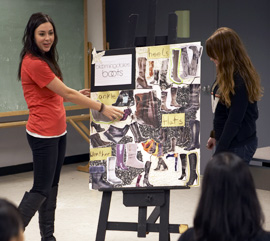
11. Be a costume designer/set designer - Have students consider what it would be like to stage a production of the story. Using magazines, newspapers, advertisements, etc., students create fashion boards to represent how they would dress the main characters and/or set boards to detail how they would set the stage including backdrops, lighting, props, etc. Write-ups should include why these visual choices were made and how they relate to the text using concrete examples.
12. Create a character diary - Students choose a character from the book and compose a diary or journal with a set number of entries discussing important events in the story from the character's point of view.